Installation and Operation:
The
Thermaltake BigTyp 14 Pro CPU cooler was installed in a system with the following components for testing during this review:
» Intel Core 2 Duo E8400 Dual Core processor
» ASUS P5E64 WS Evolution ATX motherboard
» Leadtek Limited WinFast GTX260 EXTREME+ 896MB video card
» Maxtor MaxLine III 250GB SATA 3Gbps SATA hard drive
» G.Skill Pi Series PC3-12800 1600MHz DDR3 dual channel memory
» Nesteq EECS 700 Watt power supply
» Windows Vista Home Premium, 64-Bit


This system is run on an open testbed, and there were no issues with the installation. The cooler bolted through the board rather easily, and there were no interference issues with any nearby component. Even the taller G.Skill brand memory modules were not an issue.
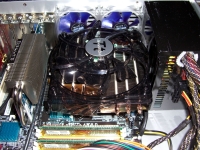
While we will return to the system listed above for testing, the image below shows the cooler installed on a different setup. Below we see it installed in an HTPC case, something I have not been able to do with an aftermarket cooler for a while. In general this system runs a stock Intel cooler because most others I have reviewed have been too tall to fit. Even compact heatpipe towers like the OCZ Technology Vendetta are too tall. But here we see that the BigTyp 14 Pro fits, it was rather easy to install, and yes you can close the lid without it touching the fan.
Remove the fan and you may be able to fit this cooler into even more systems. I mentioned on the previous page that I was interested in trying it out with a fan mounted to the underside of the fins. The next image shows that you can get up to a 92mm fan (25mm thick) in under there. There is slight pressure from the heatpipes holding it in place, but a few zip ties would secure it well for extended use.
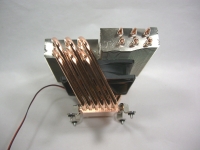
The image above also shows what the Intel mounting hardware looks like when installed.



