Installation and Operation:
To install the
CoolIT Systems Domino A.L.C., you'll first need to remove your motherboard and attach the appropriate mounting plate. The unit comes pre-configured for socket 1366 and is easily re-configured for socket 775 by moving a few C clips. In order to use the cooler for AMD processors you simply undo the black screw and attach the provided bracket.
As was shown on the previous page, CoolIT Systems has pre-applied their own thermal compound. I would liken it to an Arctic Silver type product, and it was used for testing in this review.
The
CoolIT Systems Domino A.L.C. CPU cooler is an all-in-one solution that might possibly be easier to install than a typical air cooler. You basically mount the water block to the CPU and then mount the radiator like you were installing a case fan. There is minimal wiring to connect and zero no plumbing to do.


The CoolIT Domino A.L.C. was installed in a test system with the following components:
» Intel Core i7 920 (2.66GHz) processor
» MSI x58M uATX motherboard
» BFG GeForce GTX 260 MAX CORE 55 896MB PCIe video card
» Seagate 500GB SATA 3Gbps hard drive
» OCS Platinum PC12600 1600MHz DDR3 Triple-Channel memory
» Cooler Master Real Power Pro 750 power supply
» Windows 7 RC 64-bit operating system
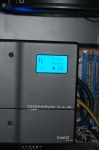
The unit itself is fairly straightforward. It has an LCD screen that shows you which mode the unit is currently operating in, the pump speed, fan speed, and coolant temperature (which should not be confused with the CPU temperature).

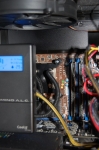
Initially the Domino was installed in an NZXT Panzerbox case, but because of clearance issues, we were not able to pre-install the unit on the removable motherboard tray. We were forced to uninstall the unit, slide the tray in and then remount the Domino. Not a deal breaker and not something you would normally run into. Below are some action shots of the Domino A.L.C. installed in the NZXT Panzerbox.
Just for fun and frolic, we also installed the cooler in an Antec Three Hundred case. It installed with no issues, mostly because of its open design and lack of a removable motherboard tray.



