In Use:
Setting up the FreeAgent Theater didn't take much time at all. Just plug in the power and A/V cables and it was ready to use on that side of things. It was docked to a PC in order to grab some audio, video, and digital photo files, and this was by far the longest step of the setup (although not difficult). Filling the drive's 250GB capacity can take hours thanks to the relatively slow USB interface.
The user interface can be described as slick, simple, stylish, and intuitive. Navigating the screen with the wireless remote was easy, and there weren't any situation where I couldn't figure out what to do next, even without reading the manual.
The next set of images will take a look at some screenshots of the FreeAgent Theater in use with a 32 inch 1080i HDTV. One note worth making is that the interface's background color is black, but shows up as blue as I tried to share enough detail from the screen with my weak photography skills.
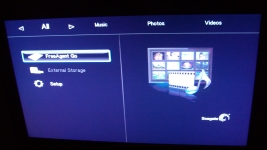
The image below shows what I would consider the main screen, which you are presented with immediately after powering up the device. Your choices are to navigate the attached FreeAgent Go storage, if you have another drive connected via USB you can navigate that separately, and the third option is to enter the device's setup options.
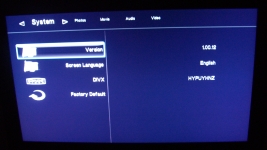
The next image shows the system setup options, where among other things you can configure the device's language and reset the device to the factory defaults in case you want to undo all changes you have made.
The below left image shows the movie setup options and the below right image shows the video setup options.
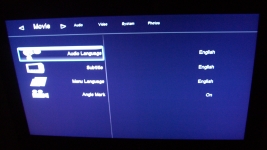
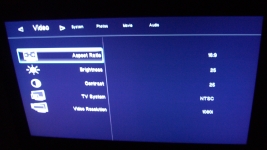
In addition to the three setup screens shown, there are also screens for configuring photos and audio. The options aren't extensive, but the basics are covered quite well.



