Testing (continued):
Everest Ultimate Edition 5.02.1756:
Lavalys' Everest Ultimate Edition has been a staple of reviews regarding system memory, but I never considered it for drive reviews until I recently saw it featured on another site. The drive benchmark is hidden in a different location from the other benchmarks, and I never saw it until I went looking for it. We have a variety of read test results (in MB/s) in the chart below, as well as an assessment of the average access time (in ms). Higher values are better for read results, while lower values are better for the average access time.
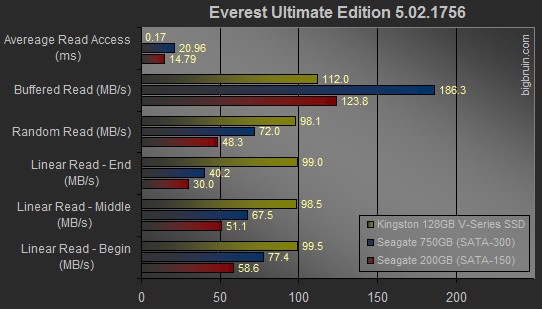
Things look about the same as on other tests. A ridiculously low access time, combined with impressively consistent read rates. Of interest is that a traditional hard drive will put out widely varying results depending on what part of the drive is being read, but since an SSD has no diameter / isn't spinning, the values are about the same at all points.
Windows 7 Boot Time:
For this test, I first booted up with the included Acronis drive utility software. I used the Windows 7 image found on the one 750GB drive to create clones on the 200GB drive and the 128GB Kingston SSD. The process was simple, and my first clue about the real world performance of the SSD was revealed when it only took 19 minutes to make an image on to it, while it took 27 minutes to make an image on to the 200GB drive.
After that, I booted the system with each drive to make sure the drivers were are all recognized, and then proceeded to do three timed boots with each drive. I started a stopwatch as soon as the system would show the post screen, and stopped the stopwatch when the cursor on the Windows desktop lost the swirling symbol that indicates that components are still loading. I took the average of the three tests and the data is provided in the chart below.
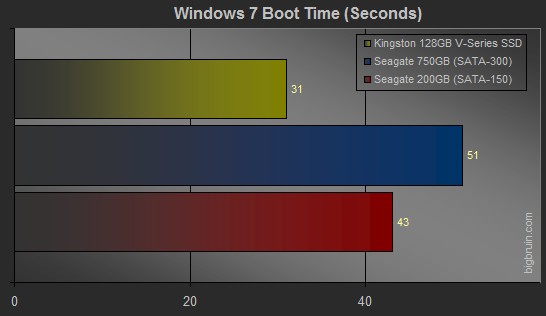
What we see is that the V Series SSD boots 12 to 20 seconds faster than the hard drives. That is quite an improvement!

