Testing (continued):
SiSoft Sandra 2009.5.15.99:
From the large suite of tests available in
SiSoft Sandra 2009.5.15.99, results for Drive Index (MB/s) and Random Access Time (ms) were chosen to analyze the performance of the hard drives on hand. Higher values are better for Drive Index, while lower values are better for Random Access Time.
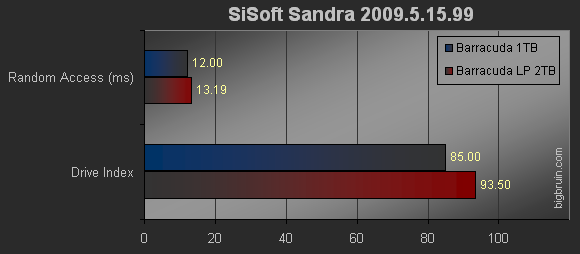
The 2GB Barracuda LP drive comes out on top in the Drive Index test, while the Barracuda 7200.11 1TB drive had a quicker random access time.
Power Consumption:
A few months ago I got a Kill A Watt EZ to test things in my house that used energy. I found out how much it costs to run my computer, battery backups, TV, fridge, and even a light bulb. Since this new series of drives from Seagate are keen on their lower power usage, I figured it would be a great benchmark tool.
My electric rate is $0.165 per kilowatt hour, so you may need to adjust the numbers to match your rate, but the relative difference would be the same.
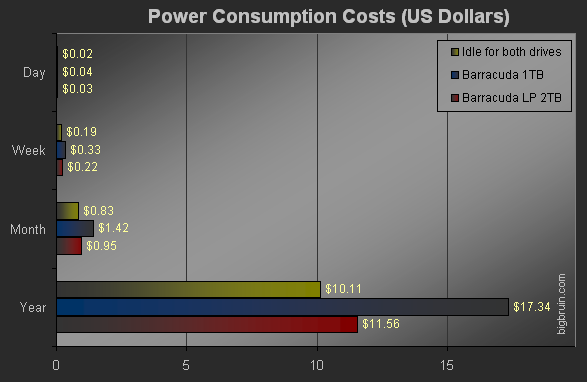
If you were to leave either drive powered on and idle it will cost you just above $10 per year. I was a little surprised that the idle condition of the drive held up to the same amounts. The load test ran for a several minutes while copying 1.95GB of data to each drive. Both drives were connected via USB 2.0, which would simulate an external storage setup.
The load test clearly puts the Barracuda LP hard drive on top. This is where you can see the energy savings with a LP drive from Seagate. Although most hard drives would not be at a load condition for an entire year, you could save roughly 33% using a LP drive rather than a non-LP drive.
Thermal Testing:
For the Thermal Testing I used CPUID HWMonitor 1.14 to monitor the idle and load temperatures on the two hard drives. For the idle condition I started the computer up with each drive in the internal how-swap enclosure and let it sit for 30 minutes. As for the load condition, I copied several Gigabytes of data (mostly large files, 500MB+) for 30 minutes.
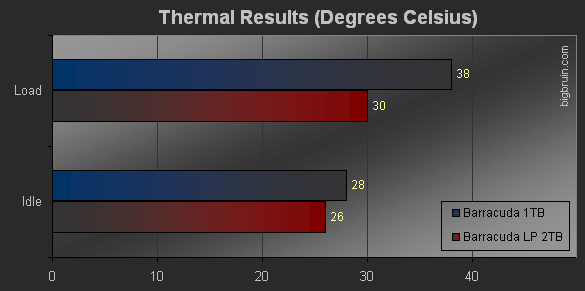
The results from the thermal testing give the Barracuda LP the clear advantage. The extra 1300RPMs are most likely the difference in producing higher temperatures for the Barracuda 1TB. If we are looking at using either drive for an external storage solution, the LP drive is definitely the way to go.

