| View previous topic :: View next topic |
| Author |
Message |
Doctor Feelgood
Arrrrghh!
Joined: 07 Apr 2003
Posts: 20352
Location: New Jersey
|
|
| Back to top |
|
 |
wmertens
Rated PG
Joined: 13 Feb 2008
Posts: 3
|
 Posted: Wed, 13 Feb 2008 13:38:13 Post Subject: Re: Eagle Tech ET-CS2LSU2-BK 2.5 Inch USB Drive Enclosure Posted: Wed, 13 Feb 2008 13:38:13 Post Subject: Re: Eagle Tech ET-CS2LSU2-BK 2.5 Inch USB Drive Enclosure |
  |
|
2 questions:
- Does it suspend the drive when the system is idling?
- Is it really limited to 250GB or does it work with the WD Scorpio 320? (this one)
Thanks for this great review 
Wout. |
|
| Back to top |
|
|
Doctor Feelgood
Arrrrghh!
Joined: 07 Apr 2003
Posts: 20352
Location: New Jersey
|
| Posted: Wed, 13 Feb 2008 13:54:09 Post Subject: |
|
|
Hi... Could you tell me more about what you mean in #1? As in, if a notebook is in sleep mode?
For #2, yes that 320GB drive was used in the review...
| Quote: | | With the drive powered up and connected to Windows XP, I was happy to see one item in the list of official specifications was wrong. It states that the ET-CS2LSU2-BK "Works with 2.5"hard drives up to 250GB", but I was able to access the full formatted capacity (298GB) of the installed 320GB drive. |
It definitely sees more than 250GB! |
|
| Back to top |
|
|
wmertens
Rated PG
Joined: 13 Feb 2008
Posts: 3
|
| Posted: Thu, 14 Feb 2008 03:08:57 Post Subject: |
|
|
| Doctor Feelgood wrote: | | Hi... Could you tell me more about what you mean in #1? As in, if a notebook is in sleep mode? |
Yes, indeed. But also when the OS decides to spin down the drives. Under OS X, it also spins down the drive when you eject it. Some USB enclosures listen to the command, and others do not. I would hope a fine enclosure such as this one does spin down...
| Quote: | | For #2, yes that 320GB drive was used in the review... |
 Oops I missed that one... Oops I missed that one...
Thanks! |
|
| Back to top |
|
|
Doctor Feelgood
Arrrrghh!
Joined: 07 Apr 2003
Posts: 20352
Location: New Jersey
|
|
| Back to top |
|
|
Doctor Feelgood
Arrrrghh!
Joined: 07 Apr 2003
Posts: 20352
Location: New Jersey
|
| Posted: Fri, 15 Feb 2008 18:44:44 Post Subject: |
|
|
Just messing around with it a bit on my laptop with Vista Home Premium, what you are looking for seems to be all related to the Vista power profile...
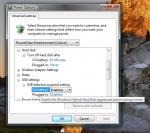
Not sure about how this (or anything else really) would work on a Mac!  |
|
| Back to top |
|
|
wmertens
Rated PG
Joined: 13 Feb 2008
Posts: 3
|
| Posted: Mon, 18 Feb 2008 12:02:06 Post Subject: |
|
|
| Doctor Feelgood wrote: | | Just messing around with it a bit on my laptop with Vista Home Premium, what you are looking for seems to be all related to the Vista power profile... |
Hmmm - so if you eject the drive from windows, or wait long enough, does the drive spin down? In my experience most USB enclosures simply don't do this, which means you have to be careful about leaving them connected to your system for a long time, heat-wise. |
|
| Back to top |
|
|
|