| Logisys Silver Phantom Case - Page 2 of 2 |
Appearance (continued):
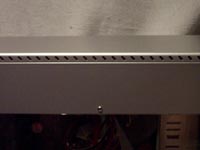
At the top of both sides of the case are some additional holes. Since we all know heat rises, and heat is a major killer of computers, this should tell you that these are ventilation holes to allow hot air to escape. We'll see how well it performs later in the testing when I cover them with tape (just for testing purposes)!
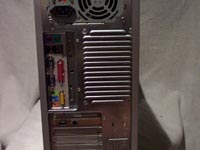
Finally, let's look at the back side of the case. Here you can see the normal removable back plate. It was pretty flimsy, and was concerned I would bend it out of place trying to get the covers off it. It would bend while I was removing the covers, but would go back into the right position when I would let it go. Above the port plate is the rear fan exhaust. Instead of being a grill, they have opted for a louvered design. I've started to see this on more cases as it allows for better cooling and less noise from the exhaust. Below the exhaust port, you can see two additional ports, in case your new motherboard doesn't include those on the back plate, but rather as an add-in.
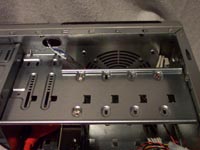
Now let's take a look at the inside. The motherboard tray is not removeable, but there is ample room to install your motherboard without concern of anything interferring with it. If your processor heat sink and fan lay close to the edge of your motherboard, you might need to install it first, or remove the power supply in order to install it. In the front of the case, you can see a place to mount a 120mm fan in front of your 3.5 internal drive bays. This will pull the air in through the front metal mesh grill. On the back, they have mounted a 120mm fan as your exhaust. Instead of screwing the back fan into place, they have opted to install brackets for the mounting of the fan. This fan blows the air out through the louvered grill.
 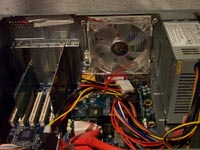
One of the concerns when installing components in any case is sharp edges. All the edges in this case have been folded to reduce the possibility of cutting yourself when installing components.
Performance:
After you address the aestethics and installation of components in a case, the next major factor is how well your cooling needs are met. If the inside of the case can't be kept cool, then the rest of the components work harder and hotter.
The Logisys Phantom, includes two fans for you. A Rear 120mm and a side panel 80mm. Both fans are very quiet and do their job rather well. The Phantom also has the vents at the top of the case. Since most cases come with a fan on the side panel, and a rear fan (maybe two), the vents offer the biggest change.
The components installed for the temperature readings are:
• AMD 64 3200+
• Titan Siberia CPU Cooler
• MSI K8T Neo MB
• 1 Gig Ultra 3200 DDR Ram
• 2 200 GB Western Digital SE
• PNY GeForce 5600 Ultra Video Card
• Enermax 365W PS
I let the system sit for 24 hours to get the idle temperatures, and the following applications were run 4 hours to get the load temperatures:
• Everquest 2
• Folding @Home
• Photoshop
• Dreamweaver
• iTunes
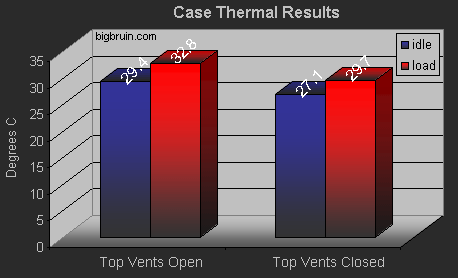
Here you can see how well the system cools. I found a 2 - 3 degree difference whether the top vents are open or closed (covered with electrical tape).
Conclusion
With the computer case market becoming saturated with cases in hundreds of designs, the Logisys Phantom gives you enough of a unique look without going overboard. With the included fans and top vents, it will help keep your components cool without having to add in multiple fans. The etched side panel is a nice touch, and gives the window a little extra flare.
Although a search of PriceGrabber turns up nothing, this case can be found at a few outlets for a reasonable price just under $70. A couple locations worth checking out are Spaztech, Newegg, and ZipZoomFly. With your purchase at these locations you get the case and the 480w power supply that was not supplied for this review.
Final Rating (4 out of 5 stars): 
 Pros:
Pros:
• Above average cooling
• Great looks
• Quiet operation
• Tool-less side panel
Cons:
• No filter for front 120mm fan
• Front USB location difficult to access if case sits on floor
Special thanks to Logisys for providing the Silver Phantom Case to BigBruin.Com for review!
Please drop by the BigBruin.Com Forum and feel free to discuss this review.
Page 1 | Page 2 | Home | Forum | Review Index
|
|
|
|