| mCubed T-Balancer Fan Controller - Page 1 of 2 |
Rarely does a product emerge that is truly new and different. The T-Balancer from mCubed is exactly that. There are many ways to control the speed of fans on a computer. The most common involves some sort of a fanbus or rheostat with knobs on the front. Turn the knob up and the fan goes faster, down and it goes slower, pretty simple. The T-Balancer is nothing even remotely close to a fanbus.
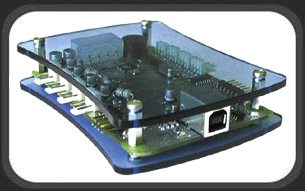
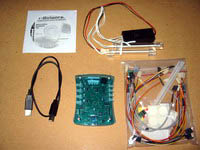
The T-Balancer itself comes in two different forms, one, the SL-4 is a PCI slot model that doesn’t actually use a PCI slot on the motherboard, just fills a slot in the case. The second form is the one sent to me for review, a small circuit board with Plexiglas covers on both sides called the XL. This is meant to be mounted with included Velcro anywhere inside your case.
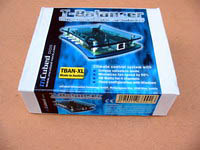 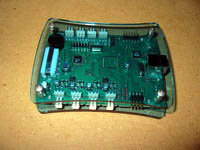
Most fan controllers control the speed of a fan by varying a resistance and therefore varying the voltage that goes to the fan. The mCubed T-Balancer accomplishes its control in a much better way. Using Pulse Width Modulation (PWM), the T-Balancer is able to take a fan from full speed to completely off, something difficult to find in a voltage-varying controller.
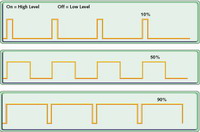
Pulse Width Modulation is a way of digitally encoding analog signal levels. The PWM controller on the T-Balancer will vary the duty cycle of the pulsed 12 volt outputs. You can actually see this pulsing in an LED fan when you set fan outputs to 1 or 2%. The LED’s will slowly blink. Not enough power to overcome the starting current of the fan motor, but still enough to flash the LED’s. Below is a representation of the duty cycle involved with PWM. As you can see, the longer the on-time, the faster the fan will run or the brighter the light will be.
Hardware:
Included in the package with the T-Balancer are 4 sensors, two short CCFL’s with inverter, extension cables, fan sensor cables, wire ties, Velcro pads, internal and external USB cables and instructions.
 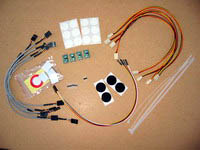
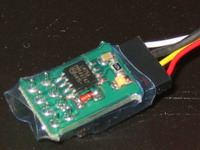
The sensors are actually small temperature measuring circuits that communicate over a bus to the T-Balancer. Each sensor has a number underneath the connectors that corresponds to that sensors address. Up to 8 sensors can be linked together for 8 different temperature measurement channels. 4 sensors are included with the T-Balancer. When the sensors are attached correctly and communicating with the T-Balancer, a tiny yellow LED will light up on each sensor. This is a nice troubleshooting touch that comes in handy because the sensor cables can be plugged in either way, with only one way being correct. Below is the set of 4, and a close up of sensor #0.
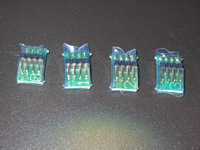 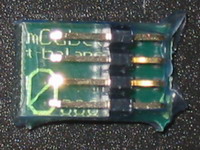
The other side of the sensor contains a small circuit and a few discrete components. I believe the larger Zener diode next to the circuit is the component actually measuring the temperature. A Zener diode will vary its resistance directly proportional to its temperature: a perfect temperature sensor. A close up of the business side of a sensor.
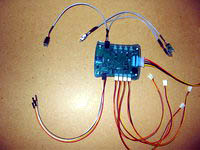
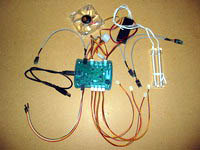
After hooking up 3 fans and the included double CCFL tube arrangement, the bus of sensors, power, and USB communications, I powered up the machine and the mCubed T-Balancer came to life. The fans all seemed to be going full speed, yellow LEDs were lit up on the sensors, and flashing slowly on the T-Balancer itself. There is even a header for an external LED. You could plug your power LED from your case into this header instead of the motherboard and have external indications of alarms and the general state of the T-Balancer. I loaded the included software and communications to the T-Balancer was established.
Please read on to the next page for more... Next
Page 1 | Page 2 | Home | Forum | Review Index | Page Views:
|
|
|
|



